Your regulars serve themselves, no more queue at the counter
Identify, pick a session, pay: a few taps and your regular is on their way to the bed, while your team stays with the customers who need them. Every safety rule you run today keeps applying.
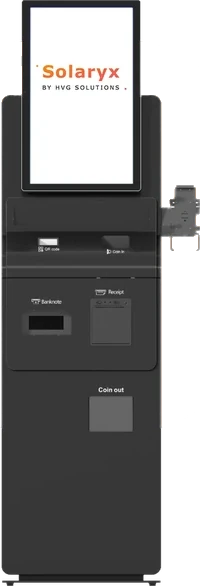
Three ways to use the kiosk
The kiosk that helps at the counter and the one that opens your evenings run the same software. You can move up to the next mode later.
1. Order terminal
The customer identifies, picks a session and pays with their prepaid balance or session pack. Staff start the bed with one tap. Your queue drops, your legal setup does not change.
200 € / month per kiosk, payment terminal built in and included.
2. Checkout terminal
Same thing, plus card payments at the kiosk. Staff still start the beds.
200 € / month per kiosk, payment terminal built in and included.
3. Autonomous kiosk
The kiosk starts the bed itself through the relay box. This is what extends your opening hours.
200 € / month per kiosk with a payment terminal, 400 € with cash payments as well.
Open longer, with no risk for your salon
The kiosk applies the same rules as your counter and keeps a record of every session it starts. If an inspector comes by, the proof is already there.
Only a customer you know can start a bed: identified by the card handed over at reception. No shortcut, and no "start anyway" button.
What the kiosk does
Identification That Actually Identifies
The salon card handed over at reception, one active card per customer.
Every Safety Rule Still Applies
Skin type, age, delay, first session halved, maximum duration: the kiosk calls the same rules as your register.
The Proof An Inspector Will Ask For
Each session records what was applied that day: skin type, duration cap, delay, rank in the series. Not what today's settings would produce.
Keeps Working Without Internet
Identification, safety checks and bed control run on the salon network: a provider outage does not stop the kiosk.
Staff Overlay, Inside The Rules
Your team unlocks the kiosk with their badge to stop a session, mark a cabin cleaned or move a customer to another bed. What they cannot do is extend a duration or shorten a legal delay.
Frequently asked questions
Two prices, excluding VAT and on top of your subscription: 200 € per month per kiosk with a payment terminal built in, 400 € with cash payments as well. Rented, no setup fee. Minimum 36 months per kiosk.
Explore more
Every part of Solaryx, one click away. Or book a demo on your own salon.